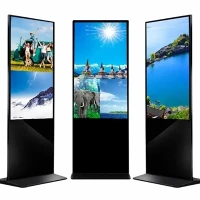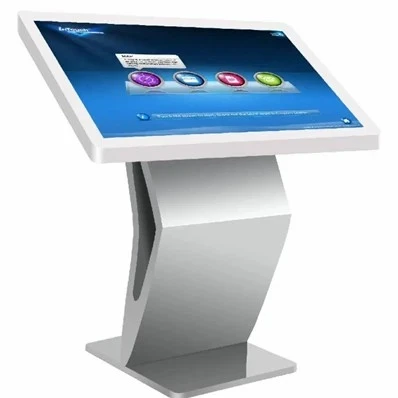
Touch All-in-one Machine
Description
Shanghai One Plus One Electronic Technology Co., Ltd is a foreign trade subsidiary of Shanghai Miansheng group located in Shanghai, China. One Plus One constantly actively adapt to the global economic development trend, promote the enterprise in transforming and upgrading, enhance the comprehensive strength of the enterprise and the brand status of the company. Shanghai One Plus One Electronic Technology Co., Ltd has gradually become one of the brand companies in the field of global business display.
Why Choose Us
Global Layout
Our company is committed to providing solutions in high quality for global customers. It has more than 1000 sales channels and service outlets in more than 140 countries and regions around the world. The products are exported to Asia, Africa, America, Europe, the Middle East and other more than 140 countries and regions.
Professional Certification
We hold various international certificates such as EC/CE certificate, FC certificate, ROHS certificate, national mandatory 3C certification, software copyright, battery quality inspection report, etc., and have passed ISO9001, ISO14001, OHSAS18001 quality system certification. Our product quality meets the strictest international standards.
Quality Control
We have a strict internal quality control system to ensure the consistent quality of our products. Our quality control team monitors every step of the manufacturing process, from the selection of high-quality materials to the testing of the final product.
Rich Experience
Our company was established in 2012 and has been deeply involved in this industry for many years and has accumulated rich experience. This provides supporting conditions for our company's product innovation and production.

Because of the small pixel pitch and high resolution per unit area, the small pitch LED screen can display higher definition graphic images and videos and can also display more led HD video and image, especially in the use of image splicing, which can be seamless and any large area splicing. Small pitch LED display is a complete system, including LED display system, HD display control system and heat dissipation system, etc.

Outdoor LED sign panels use light-emitting diodes to power screens or display boards outdoors. LED technology allows for bright and vibrant visuals that can be seen clearly, even under bright sunlight. Outdoor LED signs comprise small LED modules or panels that work together to form a larger display. These modules are often arranged in a grid pattern, creating large-scale signs with high resolution.

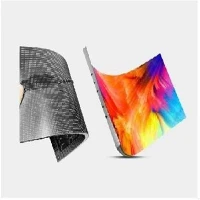
In LED display technology, various special-shaped screens have obvious differences in appearance compared with traditional ordinary screens. These special-shaped screens can be presented in different shapes, such as spheres, grids, etc., which makes them widely applicable in various installation environments. Its unique appearance often attracts the audience's attention and becomes the focus of attention.

Transparent LED curtain screen is a large spacing LED display screen to meet the display needs of large area such as real estate projects, business centers, glass curtain walls, hotels and high-rise building facades, and can take into account the characteristics of light, thin and transparent. It is a spliced LED display module composed of LED point light source, PC card strip, aluminum buckle, steel wire and other components.

COB is a kind of LED display packaging technology. LED light-emitting chips are directly bonded to the module board with high precision and connected to driver components on the module board through special media for overall protection of the light-emitting surface. COB packaging eliminates the two key procedures of turning LED chips into lamp beads and reflow soldering as compared to standard SMD packaging.
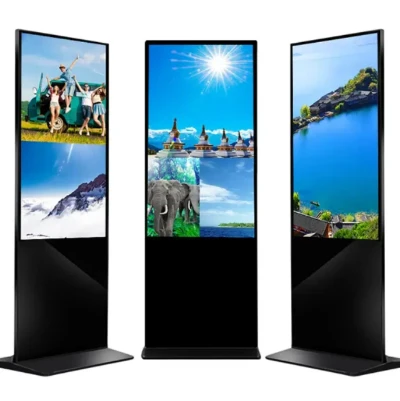
Our advertising machines are divided into vertical advertising machines and floor-standing advertising machines.The advertising machine is a new generation of intelligent equipment. It forms a complete advertising broadcast control system through terminal software control, network information transmission and multimedia terminal display, and uses multimedia materials such as pictures, text, videos, and widgets (weather, exchange rates, etc.)
Introduction of Touch All-In-One Machine
Compared with other advertising machines and display screens, the touch all-in-one machine has the advantage of being easy to use and convenient. The main reason is that there is no separate structure between the host and the display screen, and it can be started with only one power cord, so it is more convenient to install the touch screen all-in-one machine. Secondly, the touch all-in-one machine does not require complicated operation of mouse programs and keyboard input, and even people who do not know how to use computers can easily operate it.
Benefits of Touch All-In-One Machine Used in Hospital
Improve Work Efficiency
The touch all-in-one machine can integrate multiple functions, such as registration, payment, inquiry, etc., which can improve the hospital's work efficiency. The traditional paper registration method takes a long time, but the touch all-in-one machine can quickly complete the registration process through a simple operation interface, avoiding the tedious process of manual queuing and improving the efficiency of patient treatment.
Make It Easier for Patients to Seek Treatment
The touch all-in-one machine can provide patients with convenient consultation services. Patients can quickly complete registration, payment, inquiry and other operations through the touch all-in-one machine without waiting in line, saving valuable time. In addition, the all-in-one machine can provide relevant guidance and health knowledge to facilitate patients to obtain necessary information and improve the medical treatment experience.
Reduce Hospital Transaction Costs
The use of touch all-in-one machines can reduce the hospital's manpower needs and reduce the cost of medical affairs. The traditional manual queuing and registration method requires a lot of human resources investment, but the touch all-in-one machine can automatically complete the process, reducing waiting time in line and improving treatment efficiency.
Data Statistics and Management Are More Convenient
The hospital uses touch all-in-one machines to facilitate data statistics and management. The all-in-one machine can record relevant information when patients visit, such as registration time, medical record information, etc. These data can be easily exported and organized to provide support for hospital management and decision-making. At the same time, the patient's historical medical records and examination results can be easily checked through the touch all-in-one machine, providing more personalized diagnosis and treatment services.
Improve the Cleanliness of the Work Environment
The use of touch all-in-one machines can reduce cumbersome paper processes in hospitals. The once common paper registration forms, payment forms, etc. can be automatically completed through the all-in-one machine, avoiding the accumulation and management of paper documents and reducing the trouble.
Provide Data Security Protection
The touch all-in-one machine can use secure data transmission and storage technology to protect the patient's personal information. The all-in-one machine can verify user accounts and passwords to ensure that only authorized personnel can access and operate relevant information. At the same time, the all-in-one machine can automatically perform data backup and recovery to prevent data loss and damage.
Office Reception
Whatever business the staff is supporting, from a law firm to a construction company to a veterinary clinic, they are dealing with phones, paperwork, customers, and other employees. Touch all-in-one machines are incredibly appropriate for this environment, and they take up little room in the crowded reception desk. Touch screens also offer another way for them to interact with the PC, giving them a much-needed break from typing and mouse clicking, which can cause repetitive strain and fatigue over time.
Medical Clinics
Doctors have moved almost entirely to electronic medical records for charting their patients, and this is a good thing for anyone concerned with quality and continuity of care. With a touch all-in-one machine in every patient room, doctors and nurses can easily look up records, get vital info, and even share changes or updates with the patient. From reviewing an X-ray to watching a video detailing a physical therapy plan, the possibilities for how patient care can benefit from these computers are endless.
Classrooms and Libraries
Kids are attracted to the responsiveness of tablets and other touch screen devices, but those smaller products can't always manage the memory and processing requirements of the modern classroom.
Touch all-in-one machines offer a powerful tool to groups of all sizes. They give teachers a way to share multimedia, produce their own learning content, and engage with their students in a way that's on par with the top learning machines on the market. Libraries can make good use of these tools, too. Whether it's to stand in as a search tool for the virtual card catalog or to provide a way for kids to browse and research, the touch screen makes it seamless for even the tiniest library patrons. They are far and away one of the most user-friendly tools for a librarian to offer.
Home
Home education is on the rise, and parents want to give their children every advantage when learning in their home spaces. The touch all-in-one machine makes a suitable learning machine that can double as a personal entertainment station after school work is done. Multiple students of all grades and ages will find it simple to toggle between profiles and use the touch screen tech to complete online lectures, play educational games, and work on creative projects.
Home Offices
Another way the touch all-in-one machine is creating opportunities for performance and productivity is within the small business home office. Whether you do your work in a dedicated home office, the corner of a bedroom, a makeshift closet office, or a backyard "shoffice," this product is created to fit your business needs and your personal style without much fuss or planning.
Photography and Video Studios
Of all the small businesses out there today, photography pros and videographers have one of the best opportunities to incorporate a world-class touch all-in-one machine into their workflow. It can also function as a way for clients to view and order their prints and copies. Let them use the high-res touch screen to point out any changes they'd like to their final product before production. It's a great customer-facing solution for any artistic pro.
Senior Care Centers
One of the most sensible uses for a touch all-in-one machine is for older computer users. The larger, brighter screens are easy for seniors to see, and the touch screen capability makes it simple for them to learn the most basic programs and games. Email, web browsing, and video chat are popular uses for this demographic of consumer who may be getting their first introduction to computers at a senior center, assisted-living facility, or library program. The touch all-in-one machine is a favored choice of computer for anyone who is diving into tech for the first time, young or old.
What Should be Considered When Choose Touch All-In-One Machine

Size
First, consider the size when choosing a touch all-in-one machines. You'll probably discover that touch all-in-one machines are available in a wide variety of sizes, ranging from just a few inches to 52 inches (and larger). If you're going to install it in a conference room, for example, perhaps a larger touch all-in-one machine would work best. But if you're going to use it in individual workstations, a smaller monitor will likely suffice.
Touch Technology
All touch all-in-one machines support touch commands. However, the way in which they identify these commands varies depending on the touch technology powering it. Most touch all-in-one machines use either resistive or capacitive touch technology. Resistive touch all-in-one machines contain multiple layers separated by an inert "spacer" layer of air or gas. When touched, the upper and bottom layers make contact, thereby allowing the monitor to identify the point of touch. Capacitive touch all-in-one machines identify touch by measuring changes in capacitance.
Aspect Ratio
In addition to size and touch technology, you should also consider the aspect ratio when choosing a touch all-in-one machine. Aspect ratio refers to the ratio of the touch all-in-one machine's width to its height. 4:3 was once the dominant aspect ratio for touch all-in-one machines, but most modern touch all-in-one machines, now use an aspect ratio of 16:9.
Ports
Check to see what type of ports the touchscreen monitor has and where those ports are located. If you want to connect peripherals to it, you'll need the appropriate ports, such as an HDMI port. If the touchscreen monitor doesn't have the necessary port, you won't be able to use your desired peripheral with it. So, always check to see what type of ports it has and where they are located.
Price
Of course, price is something else to consider when choosing a touch all-in-one machine. Before buying a touch all-in-one machine, determine exactly how much you are willing to spend and stick with this budget.
How to Maintain Touch All-In-One Machine
Regular Cleaning
To keep your touch all-in-one machines, whether capacitive or resistive, in top condition, regular cleaning is essential. Use a soft microfiber cloth or specialized touchscreen cleaning wipes to gently remove smudges and fingerprints from the surface of your computer monitor. Avoid using harsh chemicals or abrasive materials that could damage the screen.
Protective Measures
Consider using screen protectors specifically designed for resistive touchscreens on your computer monitor to prevent scratches and other physical damage to your equipment. These thin films provide an additional layer of protection without compromising touch sensitivity.
Avoid Excessive Pressure
Unlike resistive touch all-in-one machines that require pressure from computer operators to register input, capacitive touch all-in-one machines are more sensitive and responsive to light touches. Applying excessive force or using sharp objects can potentially damage or break the screen of computer equipment and monitors.
Environmental Factors
Touch all-in-one machines, are not affected by extreme temperatures or humidity levels. When using touch all-in-one machines or equipment, it is important to avoid exposing them to direct sunlight for prolonged periods or storing them in excessively hot or cold environments.
Calibration
In some cases, touch all-in-one machines may require calibration to ensure accurate touch recognition on computer equipment. Check your device's settings or consult the manufacturer's instructions for guidance on how to calibrate the touchscreen.
Firmware Updates
Regularly update your computer's firmware to benefit from improvements in touchscreen display performance and stability. Manufacturers often release firmware updates that address known issues and enhance overall user experience with touch all-in-one machines.
Our Factory
Our company was established in 2012, covering an area of 20,000 square meters and employing more than 200 people.


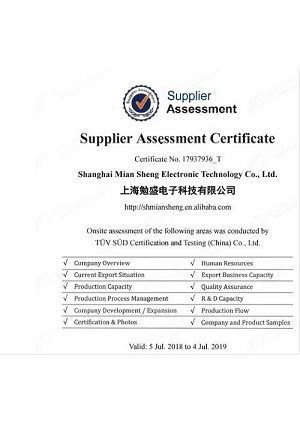
Our Certification
We have passed a number of domestic and foreign professional qualification certifications and obtained a number of certificates.


Ultimate FAQ Guide to Touch All-In-One Machine
Q: What are the advantages of using a touch all-in-one machine?
Q: What are the key components of a touch all-in-one machine?
Q: What are the operating system options for touch all-in-one machines?
Q: Do touch all-in-one machines come with built-in speakers?
Q: What is the working principle of touch all-in-one machine?
Q: What materials are used in touch all-in-one machines?
Q: What is the lifespan of touch all-in-one machine?
Q: Is touch all-in-one machine durable?
Q: Are touch all-in-one machines compatible with dual-boot setups?
Q: What should be attention to use touch all-in-one machine?
Hot Tags: touch all-in-one machine, China touch all-in-one machine manufacturers, factory, outdoor transparent led display, led display screen for advertising indoor, Wall Led Frame, thin film led display, transparent glass led display, micro pixel led
Previous
No InformationSend Inquiry