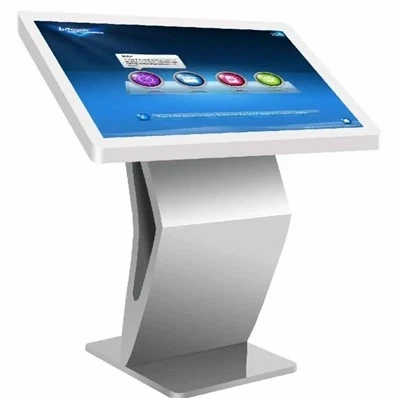
Touch All-in-one Machine
Description
Why Choose Us
Excellent Team
Excellent team,automatic management of production in first-rate ,R&D and production team
After-Sale Service
Professional and comprehensive after-sales system to ensure worry-free customer service
Quality Control
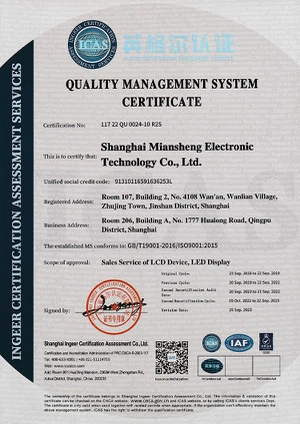
Obtained multiple system certifications,quality promised
Long Warranty
We are confident in the quality of our products and are willing to provide you with long-term technical service support.
What Is Touch All-In-One Machine
A touch-screen all-in-one computer is a computer device that combines touch screen technology. It integrates the touch screen into the display screen, allowing users to operate the computer by directly touching the screen.

The vertical advertising machine is a new generation of intelligent equipment. It forms a complete advertising broadcast control system through terminal software control, network information transmission and multimedia terminal display, and uses multimedia materials such as pictures, text, videos, and widgets (weather, exchange rates, etc.) Advertising. The original idea of the advertising machine was to change advertising from passive to active, so the interactivity of the advertising machine makes it have many public service functions and attract customers to actively browse advertisements.

The touch all-in-one machine is composed of advanced touch screen, motherboard, memory, hard disk, graphics card and other electronic components. It works on the same principle as a traditional PC. Depending on the size of the touch screen and the software, it can be used for public information inquiry, advertising display, media interaction, conference content display, offline experience store product display, etc., such as fingerprint scanners, scanners, card readers, micro printers, etc. Designed to meet specific needs such as fingerprint attendance, card swiping, and printing. Generally different from electronic whiteboards, they can achieve more functions.
1. Without the use of mouse and keyboard, just gently tap or swipe the screen with your finger to achieve all the operations of the computer, making the computer easier to use. The biggest innovation of touch computer is that it uses multi-touch technology, which completely changes the way people interact with computers.
2. Capacitive touch screen, sensitive and accurate positioning.
3. Multi-touch, ten fingers in one. Support handwriting function, can touch with fingers, soft pen, support USB interface
4. Touch no drift, automatic correction, can be precise operation.
5. Professional design of large elevation Angle; Touch model special adjustable base, up and down around rotation, so that users can adjust the best Angle of use.
6. High definition, no glass work. Low environmental requirements, high sensitivity. Suitable for all kinds of work environment.
Best 7 uses for a Touch All-In-One Machine
Considering that there are so many ways to use an Touch All-In-One Machine desktop PC, this list of seven top environments and experiences is just a start. Use these suggestions to inspire new ways to embrace the slim profile and clean look of an HP desktop touch screen computer for your business, community center, or home.
Office reception
The front desk of a busy business can become a chaotic place. Whatever business the staff is supporting, from a law firm to a construction company to a veterinary clinic, they are dealing with phones, paperwork, customers, and other employees. These front desk teams are often the heart of any business, and they would welcome simplification to their non-stop daily tasks. Luckily, there's a product that seems made for their unique work processes.
Touch All-In-One Machine are incredibly appropriate for this environment and they take up little room in the crowded reception desk. Touch screens also offer another way for them to interact with the PC, giving them a much-needed break from typing and mouse clicking, which can cause repetitive strain and fatigue over time.
Whether you have one reception professional or five, these efficient machines go a long way in respecting the precious desk real estate many reception workers struggle to maximize. They are also easily customized to provide information to those customers and vendors who may visit the front desk. AiOs have been adapted to act as a sign-in sheet, time sheet recorder, and appointment tracker, for example.
Medical clinics
Doctors have moved almost entirely to electronic medical records for charting their patients, and this is a good thing for anyone concerned with quality and continuity of care.
With an Touch All-In-One Machine computer in every patient room, doctors and nurses can easily look up records, get vital info, and even share changes or updates with the patient. From reviewing an X-ray to watching a video detailing a physical therapy plan, the possibilities for how patient care can benefit from these computers are endless.
Classrooms and libraries
Kids are attracted to the responsiveness of tablets and other touch screen devices, but those smaller products can't always manage the memory and processing requirements of the modern classroom.
Touch All-In-One Machine computers offer a powerful tool to groups of all sizes. They give teachers a way to share multimedia, produce their own learning content, and engage with their students in a way that's on par with the top learning machines on the market. Plus, the slim design can make it fit into even the tiniest classrooms, such as portable or "pop-up" classrooms.
Libraries can make good use of these tools, too. Whether it's to stand in as a search tool for the virtual card catalog or to provide a way for kids to browse and research, the touch screen makes it seamless for even the tiniest library patrons. They are far and away one of the most user-friendly tools for a librarian to offer.
Homeschools
Home education is on the rise, and parents want to give their children every advantage when learning in their homeschool spaces. The Touch All-In-One Machine product makes a suitable learning machine that can double as a personal entertainment station after school work is done.
Multiple students of all grades and ages will find it simple to toggle between profiles and use the touch screen tech to complete online lectures, play educational games, and work on creative projects.
Home offices
Another way the Touch All-In-One Machine desktop is creating opportunities for performance and productivity is within the small business home office. Whether you do your work in a dedicated home office, the corner of a bedroom, a makeshift closet office, or a backyard "shoffice," this product is created to fit your business needs and your personal style without much fuss or planning.
These PCs can easily connect to your other home devices via WiFi or Bluetooth to make them an integral part of how you run your company from home.
Photography and video studios
Of all the small businesses out there today, photography pros and videographers have one of the best opportunities to incorporate a world-class Touch All-In-One Machine computer into their workflow. It's the perfect solution for your office because it's a PC desktop with all of the storage and memory capacity you'd need to save, browse, and edit photos and videos.
It can also function as a way for clients to view and order their prints and copies. Let them use the high-res touch screen to point out any changes they'd like to their final product before production. It's a great customer-facing solution for any artistic pro.
Senior care centers
One of the most sensible uses for a touch screen desktop monitor is for older computer users. The larger, brighter screens are easy for seniors to see, and the touch screen capability makes it simple for them to learn the most basic programs and games.
Email, web browsing, and video chat are popular uses for this demographic of consumer who may be getting their first introduction to computers at a senior center, assisted-living facility, or library program. The AiO is a favored choice of computer for anyone who is diving into tech for the first time, young or old.
What Are the Differences Between a Touch-Based All-in-One Machine and a Computer
Appearance
Ordinary computer products touch all-in-one computer, desktop computer or notebook computer, the common size of 11-42 inches, are generally used on the desktop; and touch machine broke the size limit, size of 17-98 inches, display wall hanging, floor, mobile and so on.
Configuration
Ordinary computers are basically LCD screen, host, coupled with the operation needs to use the keyboard and mouse, notebook words, it is to combine these several kinds of together.The touch all-in-one machine is mainly composed of LCD screen, touch screen and computer host. According to the application requirements, some other hardware devices or external equipment will also be installed.
Process
Ordinary computers to touch the all-in-one machine hardware raw materials of the quality and production process requirements are not very high.And touch all-in-one machine is different, is built in accordance with the industrial requirements, whether the quality of hardware raw materials, installation steps or production process are very strict.
Functions
Ordinary computers need to use the external keyboard and mouse, while the touch all-in-one machine abandons the mouse and keyboard, after the power, people only need to use their fingers to touch on the screen, you can complete the operation, more convenient, simple and fast.
Application
The use of the ordinary computer all-in-one machine is generally home or office.And touch all-in-one machine is widely used, is widely used in teaching, conference, display, query and so on.
Seven Factors to Consider When Choosing a Touch All-in-One Machine
LCD screen type
Touch all-in-one LCD screen can be divided into TN screen, IPS screen, PLS screen, VA screen. Many people in the purchase of touch all-in-one did not pay attention to the type of LCD screen, in fact, IPS LCD screen, whether it is the resolution, or service life and stability are better than other LCD screens, so you should try to choose IPS LCD screen touch all-in-one.
Touch technology
Now there are many types of touch technology, but the touch technology for large-size devices or infrared touch screen technology is better, can support multi-person operation, accuracy is also higher, you can consult the purchase of touch all-in-one machine to buy what touch technology.
Configuration
The configuration of the touch all-in-one machine and the computer is almost the same, buy what configuration needs to be combined with the actual use of the demand to decide, first of all, clear their own needs, and then according to the demand to determine the configuration can be the lowest cost to buy the most suitable touch all-in-one machine.
Functional application
Touch all-in-one need to have some basic functions, such as Internet access, office office, annotations, etc., and good to actually try to find out whether these features have a user experience, whether it is easy to use smooth, whether the function is complete.
Operating system
Some touch all-in-one will use Windows and Android dual system, in fact, practice shows that dual system is not necessary, but also increase the complexity of the operation, so as long as there is a single system of Windows can be.
Touch experience
The advantage of the touch all-in-one machine is that you can interact with electronic devices through your fingers, so the focus is on the touch experience should be good, in the purchase of the touch all-in-one machine to experience the various applications, to see if there is a good touch experience.
Manufacturer
Touch all-in-one machine manufacturer's strength determines its quality, after-sales service, so in the purchase of touch all-in-one machine as much as possible to choose a certain brand awareness, so as to ensure that the quality of the product is qualified as well as follow-up after-sales service to keep up.
1. Touch all-in-one machine is mainly through the LCD screen display, do not touch with sharp objects to avoid scratching and damage to the LCD screen;
2. Clean the LCD screen, you need to use a dry cotton cloth to gently wipe the surface, do not use chemical cleaners and other corrosive liquids, so as not to cause texture changes in the screen, affecting the picture texture;
3. The machine's touch screen for glass fragile, avoid major objects for impact;
4. Do not place the touch all-in-one machine in a closed space, or blocking the device, not conducive to the operation of the device for heat dissipation, the temperature is too high may cause damage to the device;
5. All-in-one machine has a fixed use of rated voltage, it is recommended to use a stable power supply, not and high-power equipment using the same power supply;
6. Do not touch screen all-in-one machine, placed in a complex environment, such as: direct sunlight, wind and rain, which can easily cause the machine wet, screen blackening;
7. Touch all-in-one machine failure, do not unauthorized disassembly and repair, so as not to cause damage to the equipment, electrocution, you should promptly seek professional technical maintenance personnel to carry out maintenance.
Touch All-In-One Machine Care Matters
- Do not expose the product to rain, sun exposure in the environment, so as not to affect the normal use of the product
- Do not disassemble or repair the touch all-in-one machine, so as to avoid high-voltage electric shock or other dangers, such as the need for repair, should ask a professional maintenance personnel to complete all the maintenance work
- Do not block the ventilation holes and audio pronunciation holes on the case of the touch all-in-one machine, and do not place the touch all-in-one machine near radiators, heat sources or any other equipment that may affect normal ventilation.
- Before cleaning the screen of the machine, please unplug the power cord to ensure that the touch all-in-one machine is in a state of power failure, and then gently dust off the dust with a clean, soft cloth without threads, do not use sprays directly on the screen.
- When inserting the card, if the card can not be inserted, please do not insert it, so as not to damage the card pin. In this case, please check whether the card is inserted backwards. In addition, please do not insert and remove the card in the boot state, the operation should be carried out after the shutdown of the machine.
The Maintenance Of The Touch All-In-One Machine
- It can be said that the touch all-in-one machine is very sensitive to humidity, it is more stringent requirements for air humidity, we must ensure that the environment is ventilated and dry, it is best to keep the humidity between 30% • 80%.
- Switching touch all-in-one machine must maintain a good habit, do not frequently switch the touch all-in-one machine in a short period of time, which will lead to a reduction in the life of the lamp, which will lead to its life expectancy is shortened.
- Because the touch all-in-one machine screen with static electricity, so usually infected with some dust, but remember not to use water to wipe, this is a wrong way to deal with, because the LCD screen is easy to be permanently damaged because of moisture, when we use water to wipe, water traces are likely to enter into it, at this time, must not be energized to let the water slowly evaporate.
Hardware Components Of The Touch All-In-One Machine
Shell. The appearance of the design is to give the first feeling, stylish and generous appearance design can be very good to attract the attention of consumers and improve turnover. The use of imported sheet metal materials, a number of engineers to jointly create a reasonable layout, fine craftsmanship, ergonomic design, simple and comfortable to operate, not only corrosion and oxidation, but also beautifully modeled.
LCD screen. It mainly determines the overall picture display effect of the machine, the picture is not clear, color true or not. The use of the current market better industrial-grade LED LCD A gauge screen, resolution up to 1920 * 1080, the screen display high-definition, color reproduction is true, support for a variety of data interfaces.
Touch screen. Mainly used in this type of product touch screen has infrared screen and capacitive screen two kinds, affecting the user's actual operating experience. Small size with capacitive screen, 32 inches and above with infrared screen, true 10-point touch, accurate and smooth, responsive.
Computer mainframe. Determines the machine in the application process of the operating performance of the high and low. Touchpad choose are brand accessories, such as Intel CPU, Gigabyte motherboards, Kingston memory sticks, Western Digital hard disk and so on, brand assurance, first-class quality, high performance.
Power on/off
(1) Use 100~240V AC power as the power supply of touch all-in-one machine.
(2) If the touch all-in-one screen is not turned on, please press the standby button on the remote control or touch all-in-one.
(3) If you want to turn off the Touch All-in-One system, press the standby button on the remote control or Touch All-in-One for 4-5 seconds to turn off the system and enter standby mode.
(4) If you want to turn off the touch all-in-one machine completely, please turn off the "power switch" of the touch all-in-one machine, and then disconnect the main power socket.
Automatic shutdown function
(1) In TV or AV mode, if there is no input signal for more than five minutes, the touch panel will automatically switch to standby mode.
(2) In PC (computer) mode, if the touch all-in-one machine does not work for more than five minutes, it will automatically switch to standby mode.
Save before shutdown
When shutting down, the Touch All-in-One will save the image and sound settings. In this way, when the touch all-in-one machine is turned on again, it will be in the state before shutdown.
Signal Source Application Notes
If you use PC signal source, please set the resolution of computer graphics card according to the following mode: 1920x1080@60HZ, 1280x1024@60HZ, 1280x720@60HZ, 1024x768@60HZ, 800x600@60HZ, 640x480@60HZ, and so on.
Built-in computer on/off
(1) When the touch all-in-one comes with a built-in computer, to turn on the touch all-in-one's built-in computer, press the standby button on the touch all-in-one or the remote control to turn on the screen, and then press the PC on/off button on the touch all-in-one or the remote control to turn on the built-in computer.
(2) To turn off the touch all-in-one, please use the touch or mouse to turn off the computer from the start menu according to the normal computer shutdown steps, and wait until the computer is completely shut down before using the standby key on the touch all-in-one or remote control to turn off the touch all-in-one, and you can also select the ten-point capacitive touch all-in-one without the mouse.
Our Factory
Shanghai One Plus One Electronic Technology Co.,Ltd is a foreign trade subsidiary of Shanghai Miansheng group located in Shanghai,China.One Plus One constantly actively adapt to the global economic development trend,promote the enterprise in transforming and upgrading,enhance the comprehensive strength of the enterprise and the brand status of the company.Shanghai One Plus One Electronic Technology Co.,Ltd has gradually become one of the brand companies in the field of global business display.

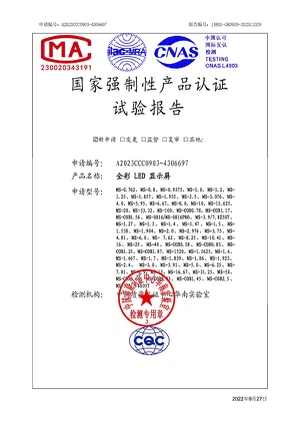
Certificate






FAQ
Q: Is an all-in-one computer better than a desktop computer?
Q: How long do all-in-one computers last?
Q: How much memory do I need on my all-in-one computer?
Q: Why buy an all-in-one computer?
Q: What is the point of all-in-one computer?
Q: How do I choose an all in one computer?
Q: Do all-in-one computers overheat?
Q: What can you do with an all in one PC?
You'll get plenty of ports for connecting other devices with an all-in-one. Turn the computer into your entertainment system with a good set of speakers. Add an external hard drive to back up your most important files and photos, or connect a printer to make hard copies.
Q: How to deal with the problem when the touch all-in-one machine fails?
Q: How to clear the cache of the touch all-in-one computer?
Q: How does the touch all-in-one machine work?
Q: What are the application scenarios of touch all-in-one machines?
Q: How to adjust the display brightness of the touch all-in-one machine?
Q: How to update the software or system of the touch all-in-one machine?
Q: How to maintain the touch all-in-one machine?
Q: Does the touch all-in-one machine support high-definition display?
Q: What should I do if the all-in-one touch screen does not respond to touch?
Q: How to correct the touch deviation of the touch all-in-one machine?
Q: How does the touch all-in-one machine ensure data security?
Q: Does the touch all-in-one machine support video conferencing function?
Hot Tags: touch all-in-one machine, China touch all-in-one machine manufacturers, factory, flexible led panel screen, Wall Led Frame, micro pixel led, flexible transparent led film screen, Small Pitch Led Display, Led Crystal Film Screen
Previous
Vertical Advertising MachineSend Inquiry